
November 6, 2026
Cursor Craft 2.1: Day & Night
Cursor Craft 2.1 adds Day & Night: pick one cursor pack for Light Mode and one for Dark Mode, and your Mac switches between them automatically.
Cursor Craft 2.1 is out now. It adds Day & Night: choose one cursor pack for Light Mode and another for Dark Mode, and Cursor Craft switches between them when macOS changes appearance.
Download Cursor Craft for Mac to get 2.1, or update from inside the app.
New: Day & Night
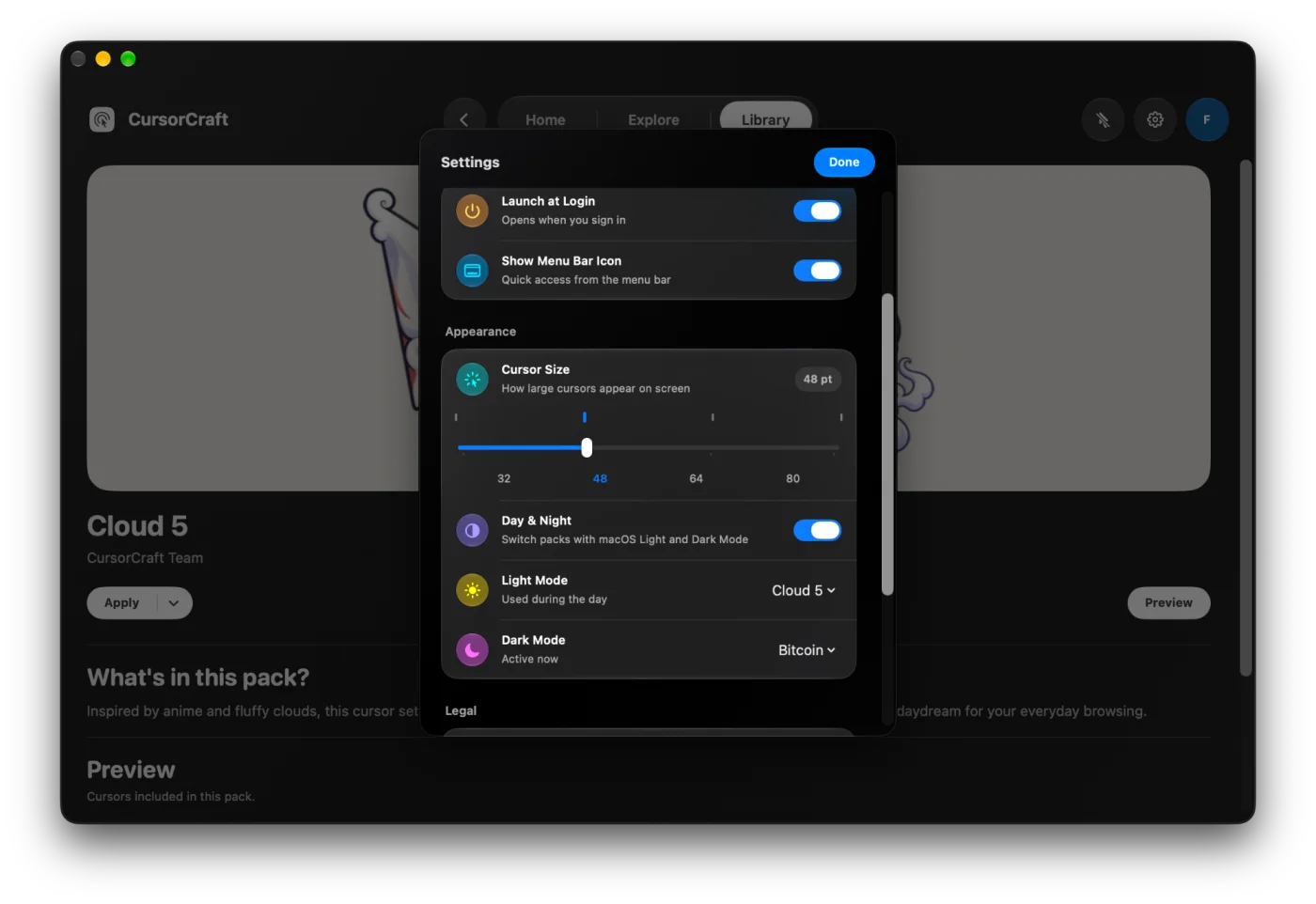
Turn it on in Settings → Appearance. Pick a pack for Light Mode and a pack for Dark Mode, and that's it. A bright pack can follow you through the day and a darker one can take over at night.
- While Day & Night is on, use the arrow next to Apply on a pack to set it for Light Mode or Dark Mode.
- It works with the macOS Auto appearance schedule, so the cursor changes when your Mac does.
- If you turn custom cursors off, Day & Night leaves them off.
Version details
Version 2.1 (build 2.1.3). Requires macOS 13 or later.
Feedback
Follow @cursor_craft for new packs and release notes. If you run into a problem or want to send feedback, email support@cursor-craft.app.