
November 6, 2026
Cursor Craft 2.1.2: Custom Toggle Shortcut
Cursor Craft 2.1.2 lets you pick your own keyboard shortcut for turning custom cursors on and off, instead of ⌃ ⌥ C.
Cursor Craft 2.1.2 is out now. You can now choose your own keyboard shortcut for turning custom cursors on and off, instead of the default ⌃ ⌥ C.
Download Cursor Craft for Mac to get 2.1.2, or update from inside the app.
New: Custom toggle shortcut
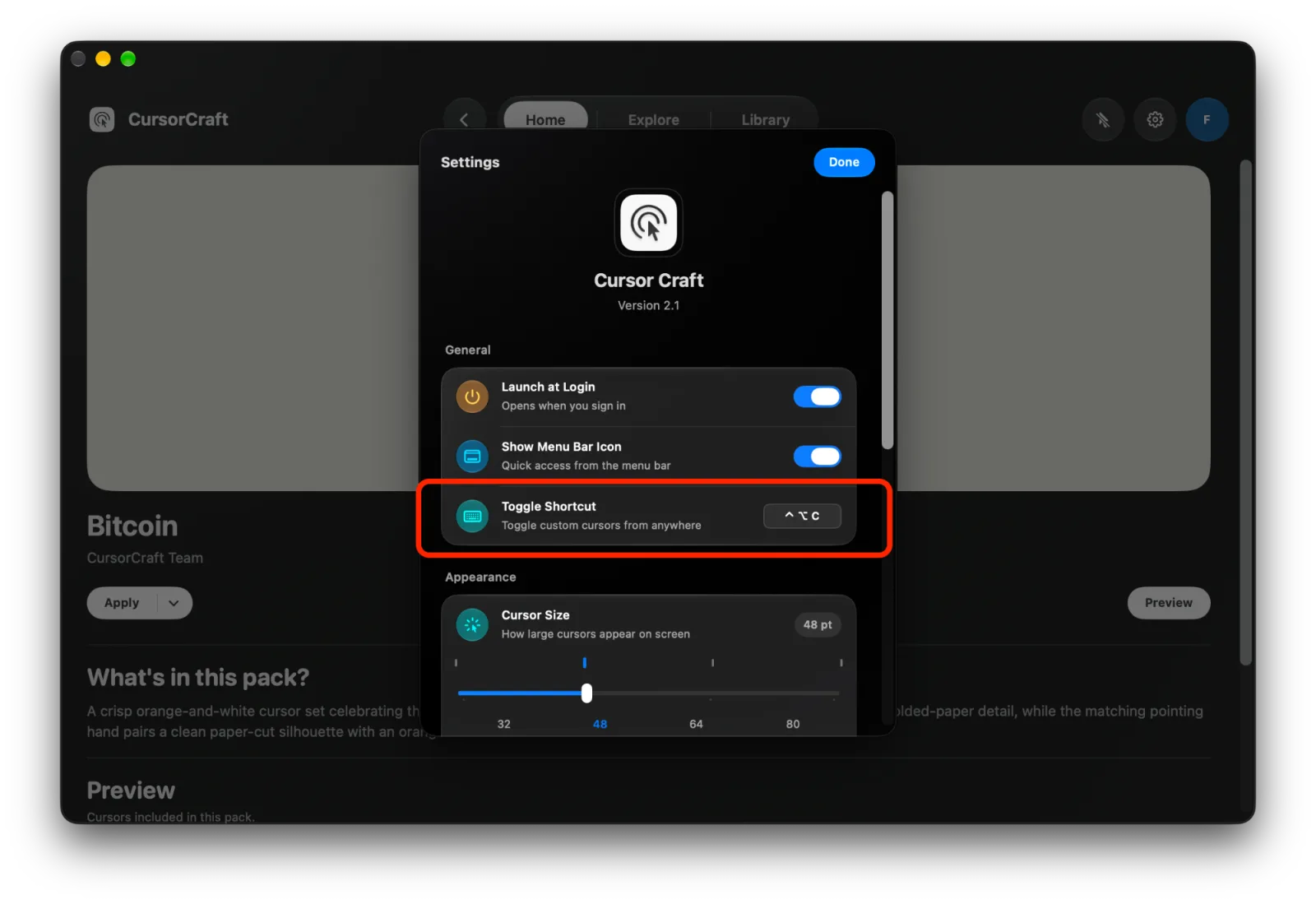
- Go to Settings → General → Toggle Shortcut, click the field and press the keys you want.
- Press Esc to cancel, Delete to turn the shortcut off, or ↺ to go back to ⌃ ⌥ C.
- If another app or macOS already uses the shortcut you pick, Cursor Craft tells you and keeps your current one.
- The menu bar menu now shows whichever shortcut you set.
Also in 2.1
Per-App Cursors from 2.1.1 and Day & Night from 2.1 are still here.
Version details
Version 2.1.2 (build 2.1.8). Requires macOS 13 or later.
Feedback
Follow @cursor_craft for new packs and release notes. If you run into a problem or want to send feedback, email support@cursor-craft.app.